


Reset Apple Wireless Keyboard Pairing
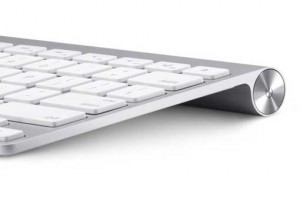
The Apple Wireless Keyboard pairing problems of it’s Bluetooth version are all too common, yet there are no easy to find instructions on Apples website, at least I couldn’t find any. If you’re like me and countless fellow Mac users that needed to reset their Apple wireless keyboard, just to run into a lengthy process of research and frustration, well then you know what I’m talking about.
It’s completely inexcusable that such a simple, yet highly demanded task is poorly documented by Apple. After all, it appears that besides using a wireless device on more than one mac, users also seem to face issues with sudden connectivity problems at random.
Now let’s focus on the problem, the reset Apple wireless keyboard pairing. The steps are rather simple:
- Turn off the Apple wireless keyboard, better yet remove the batteries.
- On your mac, click the bluetooth icon in the upper toolbar, then select “Set Up Bluetooth Device”.
- Wait for the Bluetooth Set Up Assistance to come up and start searching for devices.
- Insert the batteries then HOLD the power button, do NOT let go.
- Your wireless keyboard should now appear in the assistant.
- Select the keyboard from the list and click continue, while still holding the power button.
- Once you get the pairing code, let go of the power button and type in the code.
Your Apple wireless keyboard should now be paired and working. The trick is to hold down the power button during the entire pairing reset process, simple yet rarely documented.
If you’re still out of luck, try replacing the batteries with new, regular and fresh ones. Don’t use rechargeable batteries for this test, as some users have reported issues with them. In addition, ensure that the keyboard has been un-paired with other computers that are in the vicinity of the one you’re trying to connect to.





Great info but the basic glitch I had was that I had not unpaired the wireless keyboard from my previous computer!. Even holding the on/off button down throughout the process did no good until I realised I had to unpair the keyboard. Your suggestions were splendid once I had done that.
This site gave me the news I needed: http://support.apple.com/kb/HT1809#2
Unfortunately this does not work. I have an Apple Bluetooth wireless keyboard (generation 2, three batteries), and it is not recognized, also not with the method you provided in your post.
My batts died when I was logged off. I replaced them with new ones but it still won’t work. I can’t get in to reset the Bluetooth if I can’t type in my password. Any thoughts? Thanks.
Thanks workedlike a treat and saved my keyboard from becoming a frisbee 😛
I tried to reset my wireless keyboard because I have trouble with the Shift key and the T. It makes it capital and also when I hold the left Shift key it is writing a T. Resetting it changed the E to go from capital to small, but not the rest:-(
So annoying! Should I bring it to the Mac people? Or does anyboady have an idea?
Cheers! Sabine
Worked in my 2-battery keyboard. Thanks!
Ave Maria!
Thank you! The Ipad would recognize but not receive any input from the keyboard, but this fixed it! God bless!
In the Sacred Hearts of Jesus and Mary,
Friar John Paul
Thank you verry much. holding the power button did the trick 😀
Thank you so much for this post. I struggled for a long time to pair my keyboard.. Thanks!
As of Apr. 16th, 2015, this worked PERFECTLY with my two battery wireless keyboard.
NOTE: I did unpair the keyboard from another nearby computer and turned its bluetooth off. Not sure whether this was necessary or not.
Agreed, how can Apple not make this simpler to do? Maybe they just want to sell a new keyboard when you get a new computer or device?
You are awesome!!
Nice and useful trick. Works for me.
Thank you !
It worked for me once I unpaired the keyboard. I’m bookmarking this because I know I’ll run into it again!
Thank you!
my problem is different my mac is on but waiting for enter the password to start my personal account and the keyboard does not respond.
This method works with already paired keyboards (mine had 2 batteries), but you have to hold the power button in on the keyboard for a long time (seemed like 2 minutes or more). The LED starts blinking as the button is held, but you must continue to hold till the keyboard shows up in the Bluetooth devices list.
Thank you SO much. worked like a charm.
Thank you. Holding the Power Button made the difference. My Return Key on the wireless keyboard showed no response at all, even when OS X asked for that 6-digit confirmation when pairing. You saved my keyboard and a trip to apple store.
This worked perfectly for me! Holding the ON button to re-pair! Thanks!!
Thank you!! Holding down the power button until the pairing code was presented did the trick for me.
Thank you so much for this information!
Does not work for my A1314 keyboard wich I bought at craiglist. The keyboard is recognized, 6 digit keypass is seen and can be entered one by one when highlighted but when I press Enter to finish nothing happens (failed connection with yellow triangle). The same result on 5 IOS devices.
The batteries (Duracell not rechargable) are new and work on 3 other A1314 keyboards bought together with the failed one without any tricks.
Worked in my 2-battery keyboard. Thanks so much
Thank you for this information. Worked a charm.
keys going mad, if I press m this mn two letters come out…. ‘thjis ‘is ‘whjat ‘is ‘hjappemnimng ‘ ‘amnuy ‘idea:?
Great resolution. Thank you. After two hours of frustration, I finally paired my apple keyboard. As posted earlier, you have to have faith. Hold the power button for at least 2 minutes.
I can pair my keyboard enough for it to be found by Bluetooth, but numbers 1-9 don’t work, only the 0, \ and return button when I try to input the code. Any further help would be much appreciated.
It worked! Finding the power button on the keyboard was the trick. It is not obvious but it is on the right side exactly opposite the batteries. Not obvious.
We had the same problem trying to reconnect with the laptop we used the keyboard on before. We first did all you wrote, did not help even though the system already indicated a keyboard. Could not add another keyboard, yet no connection even though the keyboard was blinking. But, then we switched the laptop off/on while pushing the button on the keyboard. After startup I first got ‘keyboard disconnected’, so I started pushing the button again and YAY, it connected!!!
Just an FYI that might help someone else, I tried everything imaginable for about 25 minutes, but what finally resolved it was putting in fresh batteries. I assumed (incorrectly) that because I was getting the flashing green light on the keyboard, that it had enough power to function properly.
Thanks! This is *exactly* how to do it. Do NOT release the power button before having clicked Connect and the pairing code appeared or you’ll need to restart at step 1 (remove batteries).
I can’t log into my computer because the keyboard doesn’t work. How do I pair the keyboard from the login screen?
Wow!!! Soooooooo happyyyyyy that i’ve found your page about this ******* keyboard thing! Have a WONDERFULL day!!! You really made mine! Thank you! Thank you! Thank you! ???
I unpaired my PC, Windows 10, from my Apple A1314 bluetooth keyboard to recommence trying to connect. Now the PC can see the keyboard in settings/bluetooth device/add new bluetooth device, but the keyboard will not give a passcode out. The keyboard requires me hold hold down command W to get the bluetooth connectivity to start trying to pair. The PC asks for the passcode to be entered but the keyboard does not give out a passcode like it has on previous occasions. I enter any combination of 8 numbers – no luck.It should be noted the keyboard is not paired to the PC and the PC does not allow me to change anything about the bluetooth device it has detected as a new device. Any suggestions please?
I am in the Western Cape South Africa, would like to find out if there are parts for the Apple wireless keypad in Mosselbay.
hi, I have the same problem,
What I forgot, is to switch off the bluetooth of the Mac I was working on earlier, The keyboard was still connected to the Mac nr1. and when I use Mac nr 2 I could not connect.
SO make sure all the Mac computes in a short distance of the keyboard are disconnected with the keyboard.,
Worked perfectly. I didn’t realize I had to hold the on/off button the entire time. Yours was the first post that came up with the proper instructions. Thanks. Typing is so much faster.
Two battery model here. After keeping the power button pressed for something like a minute or two (during which the LED did not stay on, it went out after 10 seconds or so) the keyboard Became recognisable. At that moment the keyboard LED started blinking.
I could the even pair it with my iPhone Xs (iOS 13.5.1)
Handy for vacation!
Awesome! A morning’s frustration fixed!!
you saved me, thanks
Thank you so much! After a hour mucking around with batteries and googling for answers, I finally came across your post.